Swati Mishra

Updated 2 months ago

Simple document tasks made easier

Epson Print and Scan by Seiko Epson Corporation is a utility designed to streamline printing and scanning for compatible Epson devices. It provides straightforward tools for handling everyday documents, making it useful for both home and small office environments where ease of use matters.

Usability and functionality

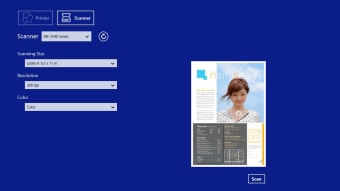
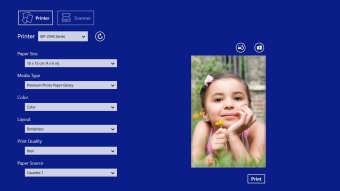
Epson Print and Scan focuses on accessibility through a clear interface with direct options for printing and scanning. Users can preview scans, adjust basic settings such as paper size or resolution, and save files in common formats including JPEG and PDF. The software integrates with Epson Connect services, enabling remote printing and cloud-based scanning for added flexibility.

Performance is generally reliable, though experiences vary depending on printer model and system setup. While it offers solid control over print and scan settings, advanced tools like editing or faxing are not included. Compatibility with newer operating systems is generally supported, but it may not function properly on Windows 11 or older hardware, making the app more suitable for users with recent Epson devices and supported OS versions.

Final thoughts

Epson Print and Scan is a practical tool for those who want a no-fuss way to manage printing and scanning. It handles essential tasks efficiently and integrates well with Epson’s cloud services, though its limited advanced features and hardware requirements may restrict its appeal for some users.

Swati Mishra

Swati has over a decade of experience in content strategy, SEO, and editorial writing across technology and travel. She specializes in technical reviews, structured guidelines, and long-form pieces. Her work focuses on clear organization, search intent, and practical takeaways for readers evaluating software and digital tools.

  • Pros

    • Straightforward interface with easy navigation
    • Supports common file formats and scan adjustments
    • Epson Connect integration for remote and cloud tasks
  • Cons

    • No built-in editing or faxing tools
    • Limited support for older devices
 0/2

App specs

Program available in other languages


User reviews about Epson Print and Scan

Have you tried Epson Print and Scan? Be the first to leave your opinion!

Add review

You may also like

Alternatives to Epson Print and Scan

Explore Apps

Latest articles

Laws concerning the use of this software vary from country to country. We do not encourage or condone the use of this program if it is in violation of these laws.
Softonic

Is Epson Print and Scan safe?

Score result: Clean

This file passed a comprehensive security scan using VirusTotal technology. It is safe to download.

  • Virus free
  • Spyware free
  • Malware free
  • Verified by Security Partners

    VirusTotal logo

Scan Info

Last scan
Saturday, January 6, 2024
Scan provider
VirusTotal

Softonic security commitment

Epson Print and Scan has been thoroughly scanned by our advanced security systems and verified by industry-leading partners. This file comes from the official developer and has passed all our security checks, showing no signs of viruses, malware, or spyware. For more information, visit our Security and Trust Center